
API Explorer
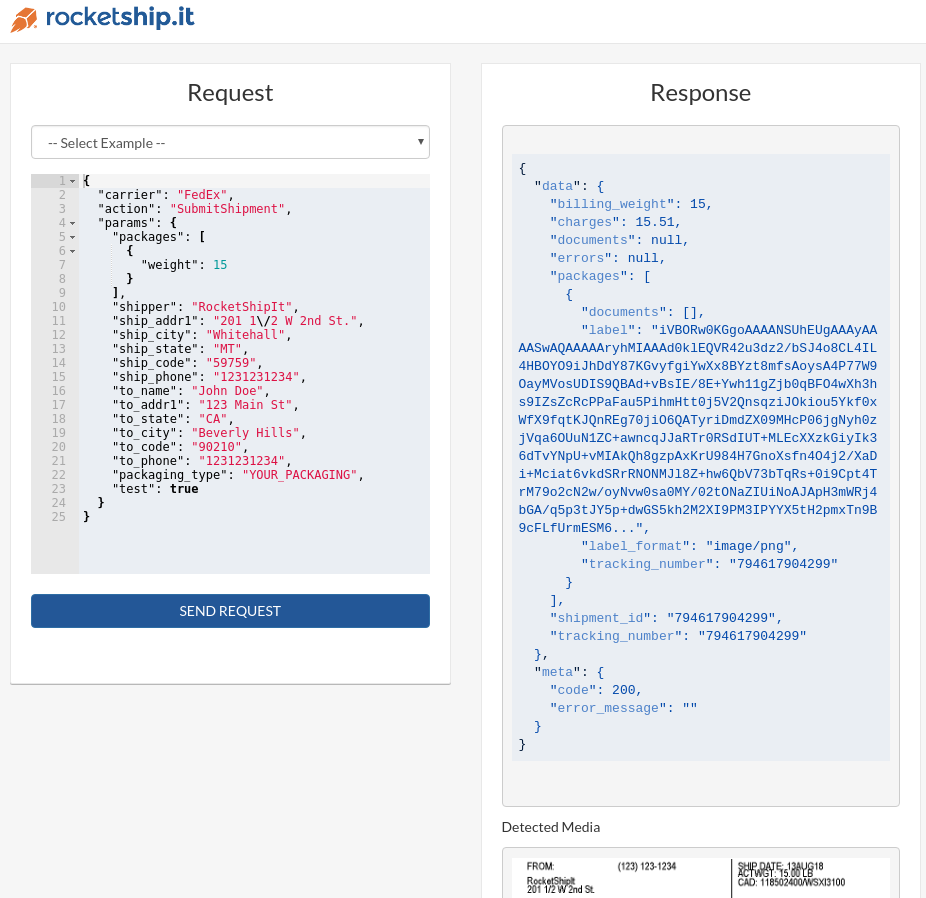
RocketShipIt comes with a built-in API explorer to quickly try the RocketShipIt API without writing a single line of code. The API explorer comes with over 500 example requests to get you started quickly.
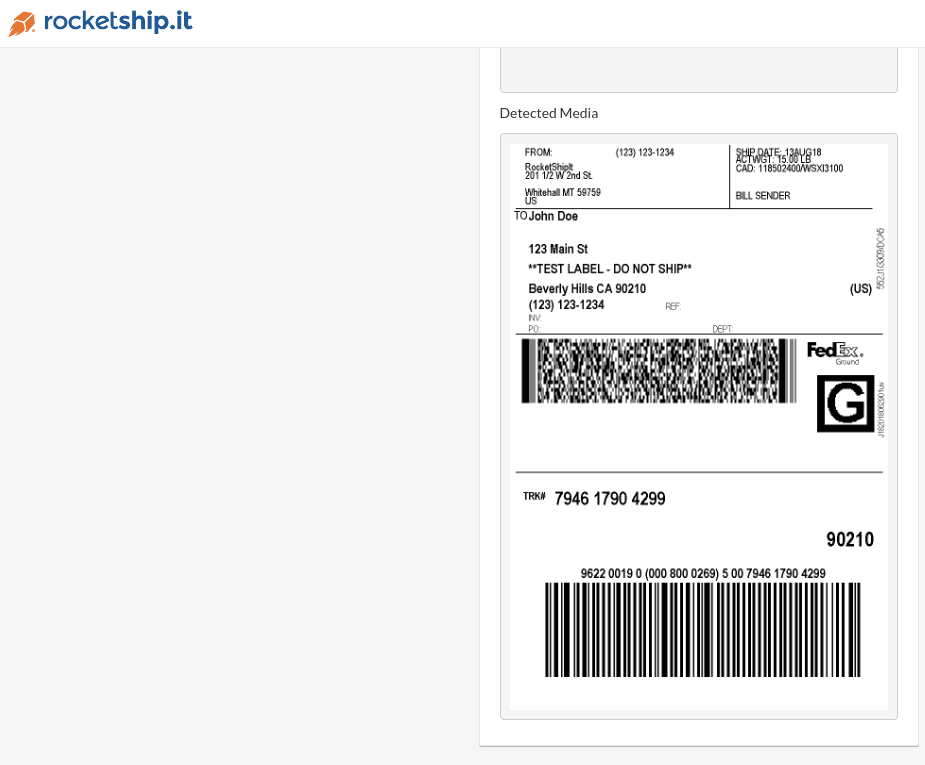
Each request can be inspected to see the raw request sent/received from the carrier along with other metadata. The API explorer will automatically detect and display any documents (shipping label, BOL, customs documents, etc.) returned in the response.
To start the API explorer run: ./RocketShipIt -s or RocketShipIt.exe -s on Windows and then navigate to http://localhost:8080 to get started.
Screenshots#
A FedEx test label request and its response:
The Media tab shows any document the carrier returns, such as this test label:
Finding Examples#
Click Browse examples, or press Ctrl+K (⌘K on a Mac), to open the
example browser. Narrow the list by carrier on the left and by action
(Ship, Rate, Track and so on) along the top. Carriers with a newer REST
version list their older APIs under Legacy APIs.
The search box also looks inside each request. Search for a parameter
such as dry_ice or saturday_delivery to find every example that uses
it. Use the arrow keys to move through the results and Enter to load
one. If you changed the request in the editor, RocketShipIt asks before
it replaces your edits.
Under the button, a link shows how many other examples there are for the carrier and action in the editor, such as "40 more FedEx-REST Ship examples". Click it to open the browser with those filters already set. When you type a parameter name, the autocomplete popup also says how many examples use that parameter.
Each example has its own link. Loading one changes the address to
/?example=<name>, and opening that address loads the example again, so
you can bookmark an example or share it with a colleague.
Autocomplete and Parameter Warnings#
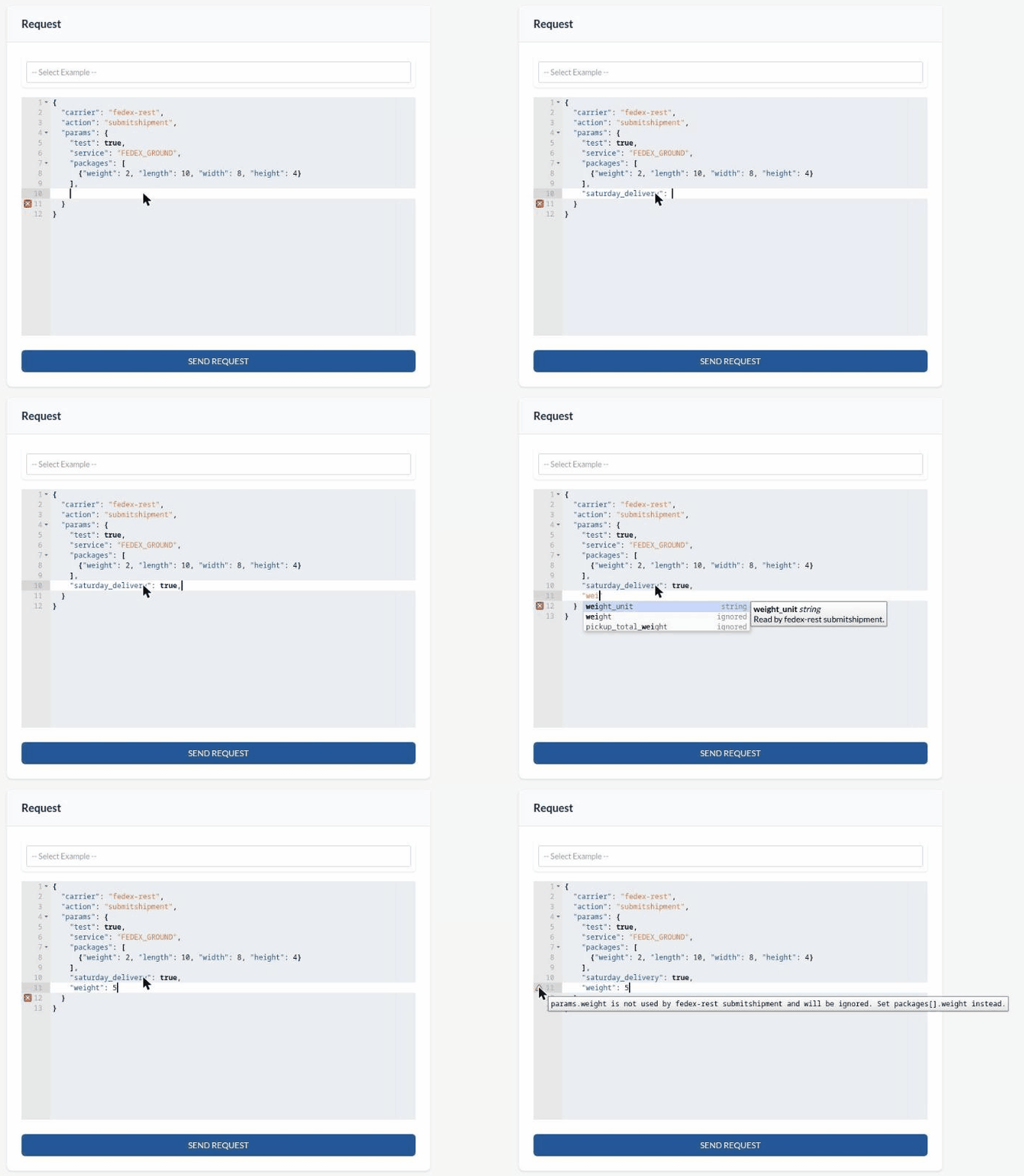
The request editor suggests values as you type. It knows every carrier,
action and RocketShipIt parameter, plus the fields of nested objects like
packages. When the request has a carrier and an action, the editor
lists first the parameters that action reads. It shows each parameter's
type and marks the ones the action ignores.
The editor also marks problems before you send the request. It underlines
a parameter that is not a RocketShipIt parameter, or one that the carrier
action does not use, and puts a warning icon next to the line. Hover over
the icon to read the warning. These are the same warnings the API returns
in meta.notices.
Defaulting Carrier Credentials#
If you use the API Explorer a lot you might find it tedious to enter your carrier credentials each time. You can default your carrier credentials using environment variables:
export RS_UPS_KEY="yourkey"
export RS_UPS_USERNAME="yourusername"
export RS_UPS_PASSWORD="yourpass"
export RS_UPS_ACCOUNT_NUMBER="youraccount"
Format:
RS_THECARRIER_PARAMETER
Once set simply omit them in your request.
More about environment variables:
- https://en.wikipedia.org/wiki/Environment_variable
- https://www.digitalocean.com/community/tutorials/how-to-read-and-set-environmental-and-shell-variables-on-a-linux-vps
Options#
By default all responses with large values will be truncated for readability followed by ...
Example:
{
  "data": {
    "billing_weight": 4,
    "charges": 13.15,
    "documents": null,
    "errors": null,
    "packages": [
      {
        "documents": [],
        "label": "iVBORw0KGgoAAAANSUhEUgAAAyAAAAV4CAIAAADXHy6fAABTzElEQVR4nOzd7fajKNc32soedf6nnD1G565ceRLFJSwQdc5P3SlFfEn8/RHk//sDAECqv3/+/Hk+n0dXAwDgIh6PhxYsAIBkAhYAQDIBCwAgmYAFAJBMwAIASPZ37wqPx+P3w/I4xM9V4kt+Lr9YwvvD32V+Cyn8a6Hk8j997svv51+frFWgUMiuOgMA83hU3KRfN/6vzLFYyO8/rS28+Pnnh2sLlAt/f1Kuc3lDm1uJ7+zmoSvUJH7Y4dTif5IVVvxSKCfyl8yuykT+mgKuLec1DWsNSIsJYHHhuqzwlXtSrCWeTjbb3uBuZv46PP5TvcDMuwak2/2IcBLBdPVeprzwnH9ZnrHOcKDNR/l1awWDUXmj0hXcTa9O7oVGqa9mm/KSa08eI/Fi88/NcuXLdQDSzZlCFrsufKl+rAlcVULAGtwZaMAzu2l/6OHCZv7SyUzA...",
        "label_format": "image/png",
        "tracking_number": "1Z0W4A780398058986"
      }
    ],
    "shipment_id": "1Z0W4A780398058986",
    "tracking_number": "1Z0W4A780398058986"
  },
  "meta": {
    "code": 200,
    "error_message": ""
  }
}
To disable this feature and show complete values add ?expand=true to the API Explorer url: http://localhost:8080?expand=true.